/技术
Webpack:We noticed you're using the `useBuiltIns` option without declaring a core-js version.
分类:技术最近更新:2026-04-15浏览:2069
在 webpack 中采用 @babel/preset-env 编译 js 语法时,报如下错误:
bashWARNING (@babel/preset-env): We noticed you're using the `useBuiltIns` option without declaring a core-js version. Currently, we assume version 2.x when no version is passed. Since this default version will likely change in future versions of Babel, we recommend explicitly setting the core-js version you are using via the `corejs` option. You should also be sure that the version you pass to the `corejs` option matches the version specified in your `package.json`'s `dependencies` section. If it doesn't, you need to run one of the following commands: npm install --save core-js@2 npm install --save core-js@3 yarn add core-js@2 yarn add core-js@3 More info about useBuiltIns: https://babeljs.io/docs/en/babel-preset-env#usebuiltins More info about core-js: https://babeljs.io/docs/en/babel-preset-env#corejs
大致意思是让我要么在 package.json 中的 dependencies 中加入了 core-js 的某个版本,要么安装 core-js(安装是不可能再安装的!)
关于 Babel7.4.0 官网对于配置 @babel/preset-env 中 useBuiltIns 的介绍:
Please note that if you are relying on browserslist's defaults query (either explicitly or by having no browserslist config), you will want to check out the No targets section for information on preset-env's behavior.
请注意,如果您依赖于 browserslist 的 defaults 查询(无论是显式的还是通过没有 browserslist 配置),您将需要查看 no targets 部分以获取有关预设 env 行为的信息。
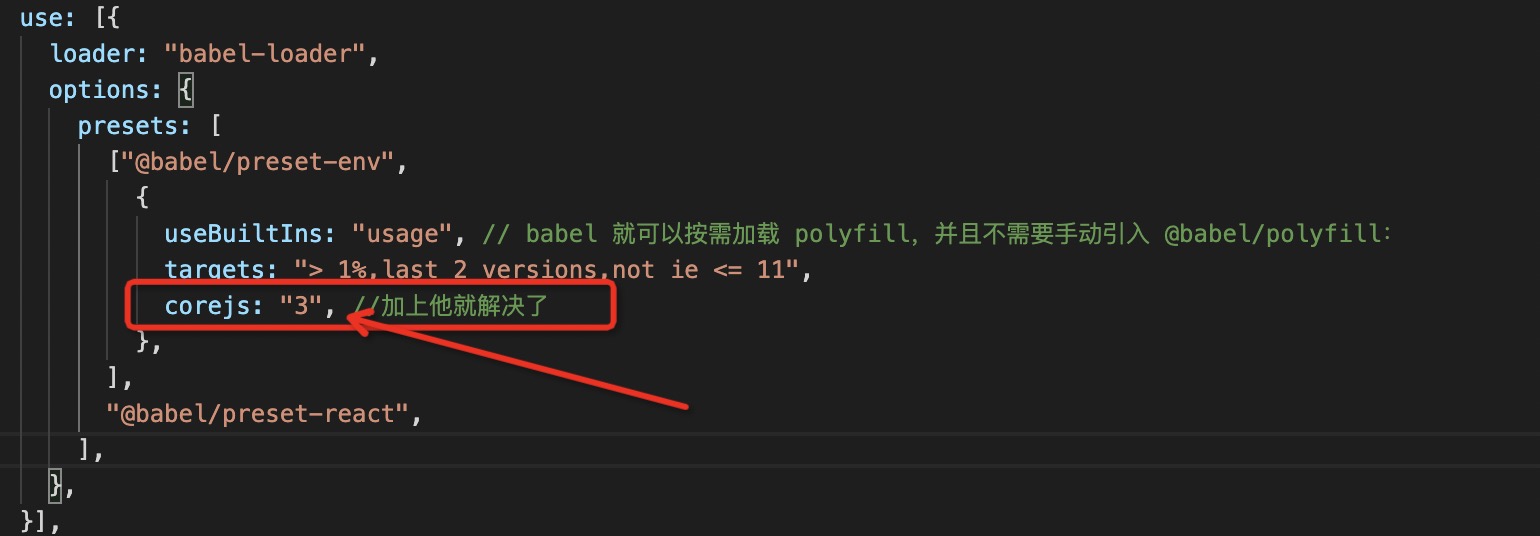
解决方案:
1、先安装依赖 core-js
2、再配置如下